Seal it. Govern it. Sign it.
minidauth takes the key out of your app. Your database holds only ciphertext, a quorum decides who can read it and can revoke that in an instant, and the completions that matter are signed by the network itself, with a key that never exists in one piece anywhere.
We added it to ten real open-source apps, from a CRM to a health-records system, without changing how anyone logs in.
Open source · MIT licensed · Node, Ruby, PHP and Python · free tier on the live network
- name
- ssn
Ten open-source apps, sealed
Not a demo app. Real projects with their own logins and their own databases, forked and made to hold only ciphertext for the fields that matter. Each one seals on write and opens only for a user a quorum granted the reading role. The same pattern works in every stack we tried: Node, Ruby, PHP and Python.
OpenEMR Sealed
Patient names, Social Security numbers and contact details. Even an administrator needs a granted role to read a chart.
Team chat · NodeRocket.Chat Sealed
The body of every message, sealed in MongoDB and opened per member, over history and in real time.
CRM · NodeTwenty Sealed
Every personal field on a contact, decrypted only in the browser so the server never sees plaintext.
Customer support · RubyChatwoot Sealed
A contact's name and phone, and the body of every support message, opened only for a granted agent.
Personal finance · PHPFirefly III Sealed
Payee names, IBANs and transaction descriptions. Balances stay in the clear, so reports still work.
Document archive · PythonPaperless-ngx Sealed
Titles, OCR text and correspondents, so the database and the full-text search index hold only ciphertext.
E-signature · NodeDocumenso Sealed
Document titles, recipient names and the signatures themselves, and each completion is quorum-signed.
E-commerce · NodeMedusa Sealed
Customer names, phones and companies, and the street lines on every order and address.
Scheduling · NodeCal.diy Sealed
Attendee names and phone numbers, and booking titles and descriptions, opened per signed-in user.
Surveys · NodeFormbricks Sealed
Every answer people submit, sealed before it reaches Postgres and opened only for a granted role.
Each name leads to what was sealed and how, with a link to the fork so you can read the whole change as a diff against upstream. See all projects, or tell us the app you want sealed next.
The problem it solves
Right now your app can read everything it stores. That is not a bug, it is how it is built: the data sits in your database and the key sits in your server, so whoever gets both gets everything. A stolen backup, a leaked environment file, a support session belonging to the wrong person. Nothing has to be broken for the data to walk out.
Encrypting the database does not fix it, because the thing that decrypts the database is standing right next to it. minidauth makes that key impossible to take, by making sure it never exists in one piece anywhere.
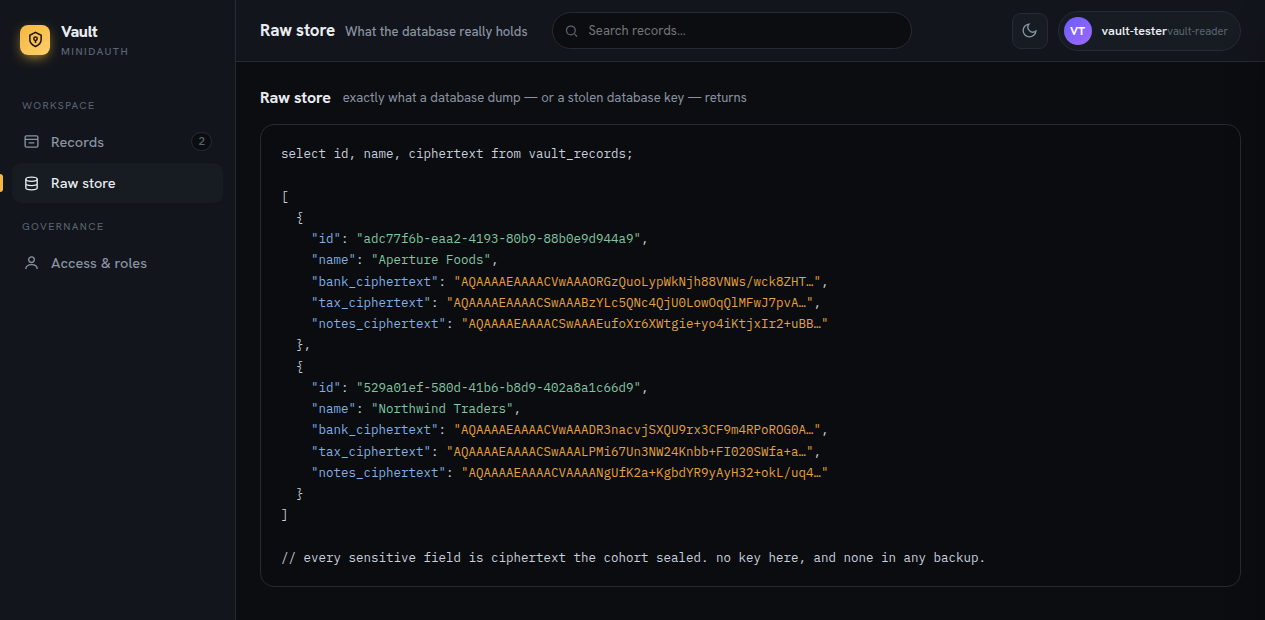
A stolen copy of your database contains nothing readable, and no key to make it readable.
How it works
-
Sealed on the way in
Your app calls minidauth to seal a field before it is written, rather than reaching for a key. There is no key on the box to steal, so ciphertext is what reaches the database, and the full-text index, and the backups.
-
Opened only for a granted reader
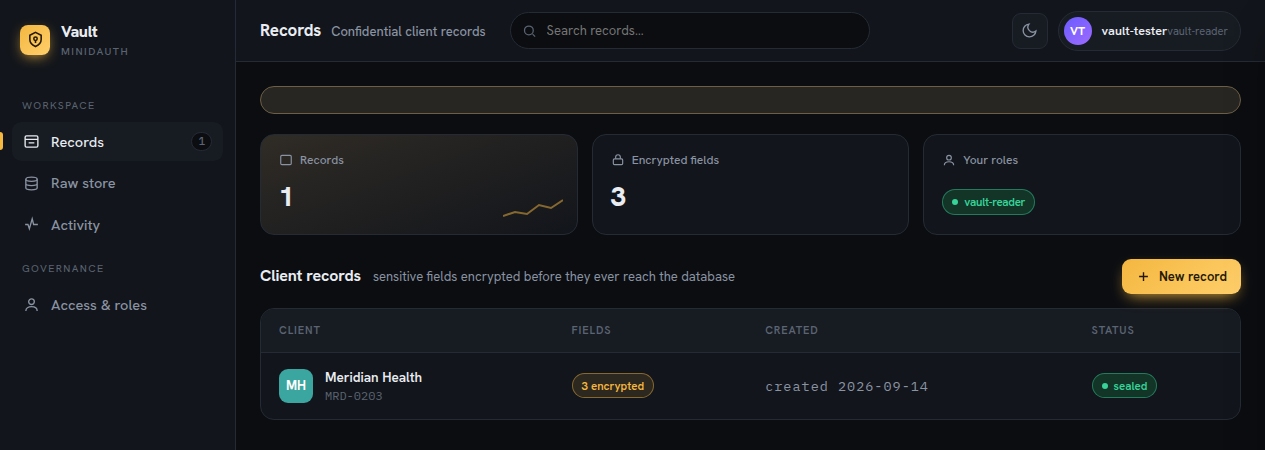
On read, the field opens back to plaintext only for the signed-in user, and only if a quorum of your admins granted that user the reading role. No reader, or the wrong one, and it stays sealed. Even an administrator is gated.
-
The network decides, and can refuse
Fourteen of twenty independent machines do the crypto together and never reassemble the key. Revoke a role and reads stop everywhere at once, with no re-encryption and no change to how anyone logs in.
Refusing is the part that encryption alone cannot do. A policy carries a contract, and that contract reads your payload before the machines will sign it, so one of these comes back signed and the other does not:
// signed by the cohort
amount=250;to=alice

// refused, by fourteen machines independently
amount=5000;to=alice
What changes in your code
Keep the login you already have. minidauth runs beside it, on Cognito, Clerk, Supabase, Better Auth or Auth0, whatever you run today, and the same integration file drops into each. See the integrations.
- Seal on write
- One hook at your data layer seals the chosen fields before they are stored. Every write path goes through the same place, so ciphertext is what lands in the database.
- Open on read
- The same hook opens the fields for the request's signed-in user, so an allowed reader sees plaintext and everyone else sees
ms1:ciphertext. - Read roles from the network
- Ask what roles someone holds on each request, instead of storing roles in your own tables. A role your app can mint is a role your app can grant itself.
// before: your database decides
if (user.role === "admin") return decrypt(record);

// after: the network decides, and can refuse
const roles = await minidauth.rolesFor(user.vuid);
Where to use it
It earns its keep when the data you hold would be bad news in someone else's hands, and you cannot honestly say your server is the last line of defence. A small team holding health records, legal files or financial detail, with no security function behind it. A product where support has to help people without being able to read their records. Any admin panel that can see everything, given that the most common breach is not a clever exploit but a valid session belonging to somebody with too much access.
Not for you if the data is public anyway, if you need analytics over
plaintext server side, or if you cannot tolerate a network hop on reads. Sealed fields are
also opaque to WHERE and ORDER BY, so what you seal is a deliberate
choice. Those are real costs and no amount of cryptography talks you out of them.
Blog
What a stolen database looks like when it is sealed
A dumped table, field by field: what a thief actually gets, and why the length of the ciphertext is all that leaks.
Field-level encryption in Postgres with a Prisma client extension
What sealing Cal.com's booking data taught us: what not to seal, failing closed, forged ciphertext, and batching.
Taking the central authority out of your app
What moves off your server when a threshold of nodes holds the key, and what that changes about asking people to trust you.
Try it
Two commands, port 8081, no Java and no build
curl -O https://raw.githubusercontent.com/sashyo/minidauth/main/docker-compose.yml
MC_ADMIN_TOKEN=$(openssl rand -hex 32) docker compose --profile public up
minidauth is MIT and free to run. The turnkey sealing setup is one compose file and a bootstrap script; the vendor key it manages needs a Tide licence, and the free tier is not limited for any of this. Read the sealing guide first, because the first policy on a key is permanent and there is no second attempt.
Stuck anywhere, or want a second pair of eyes before you deploy that first policy? Join the Discord and I'll help you get it running.